At Microsoft, I was part of the Microsoft Teams Native Video Rendering team, where I worked on video rendering architecture, developed rendering features, fixed bugs, and built tools for profiling and analyzing Teams performance.
For nearly six years, I worked extensively in the C++ render pipeline that powers video rendering in Microsoft Teams on Windows and macOS. My work ranged from the architecture and modernization of the pipeline to performance optimizations, cross-platform rendering features, and developer tooling.
Modular Render Pipeline
C++
Software Architecture
Modular Design
Polymorphism
Cross-Platform
Multithreading
Metal
Direct3D
One of my early projects on Microsoft Teams was redesigning the native video render pipeline for Teams 2.x. The existing pipeline concentrated many responsibilities in a large compositor class and relied heavily on platform-specific code paths. My goal was to break those responsibilities into interface-defined components, allowing different implementations to be selected based on platform or feature flags.
My role went beyond implementing individual components. I helped define the architecture and component boundaries, documented the design, worked through the approach with the team, broke the implementation into work items, and implemented the initial interfaces and render flow that established the new pipeline.
Previous pipeline
The previous pipeline concentrated many responsibilities in a large, monolithic Compositor class, including composition, rendering coordination, resource management, and platform-specific behavior. Platform-specific code paths were handled largely through platform-check macros.
New direction
Separate the major responsibilities of the render pipeline into focused components with clearly defined interfaces. A RenderController would own and coordinate these components, while platform-specific behavior would live in separate implementations. During initialization, a builder would select the appropriate implementations based on platform and configuration.
This moved platform and implementation details out of the orchestration logic, allowing the RenderController to operate against stable interfaces.
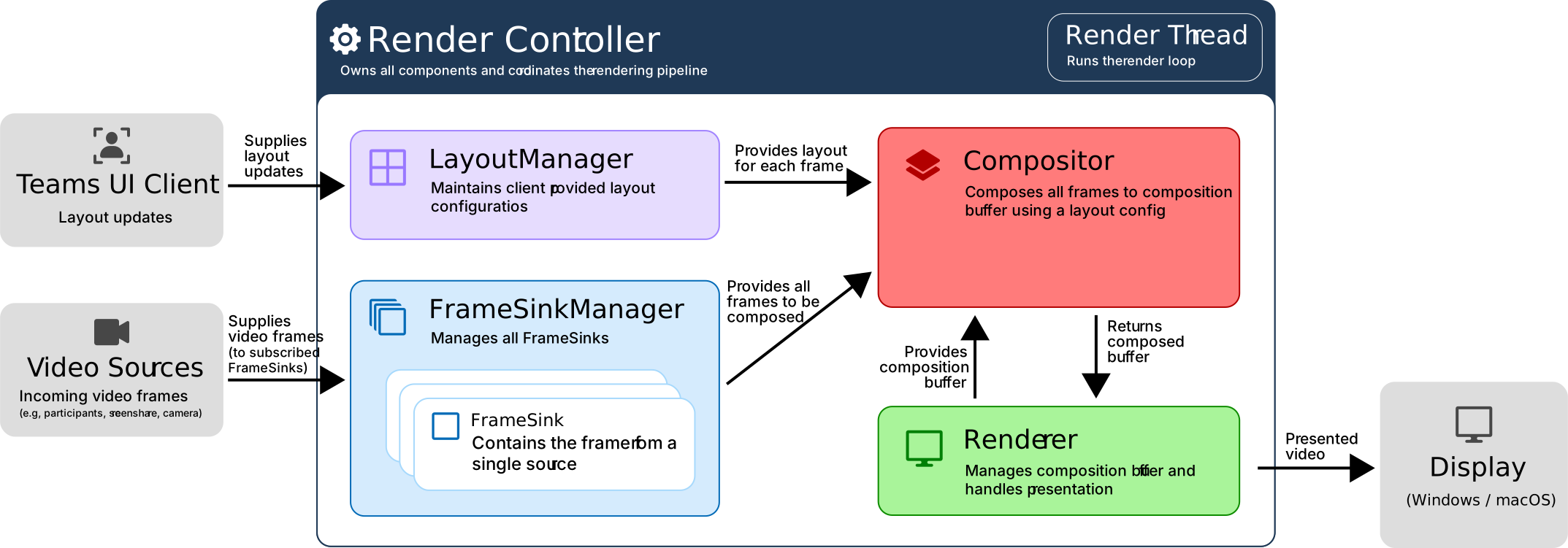
Simplified diagram of some components in the Render Pipeline (Does not show all components for simplicity and clarity)
Interfaces
Components expose interfaces according to how they are used. Components that receive calls from outside the render pipeline expose a public API interface, while components participating in the render update flow expose an internal interface used by the RenderController. Some components, such as the Renderer, require only an internal interface.
This separates operations that can be initiated externally from operations that should only occur as part of a render update.
Here are some interface examples. Note that these interfaces are simplified and not indicative of the actual interfaces in the Microsoft Teams render pipeline codebase.
Example: FrameSinkManager
Public Interface
AddFrameSink
RemoveFrameSink
RemoveAllFrameSinks
Internal Interface
GetFramesForComposition
A FrameSink represents a single video source and holds the latest frame received from that source. The public interface manages the lifetime of those sources, while the internal interface allows the RenderController to gather the current frames needed for composition during a render update.
Example: Renderer
The Renderer, for example, does not expose a public API. It participates only in the internal render flow and is accessed by the RenderController through its internal interface.
Compositor Internal Interface
CompositeFramesToBuffer
Passes in all frames from FrameSinkManager, layout config from LayoutManager, and the buffer from Renderer, and composes all frames to the buffer in the configured layout.
Renderer Internal Interface
OnBeforeComposition
Handles any resource allocations or texture mapping before we send the composition buffer to the composer.
ClearBackground
Fills the buffer with a background color.
GetBuffer
Returns the buffer so RenderController can hand it to the compositor to compose frames into the buffer.
OnAfterComposition
Performs any post-composition logic before we present the buffer, such as texture unmapping.
Present
Presents the contents of the composition buffer to the screen.
This keeps orchestration, composition, and presentation as separate responsibilities:
The RenderController coordinates the render cycle
The Compositor draws frames into the supplied buffer
The Renderer owns the buffer and platform-specific presentation logic
Component Implementations
With the component interfaces established, different implementations could provide the same contract while handling platform- or configuration-specific behavior internally. The RenderController only needed to interact with the interface and did not need to know which concrete implementation it had been given.
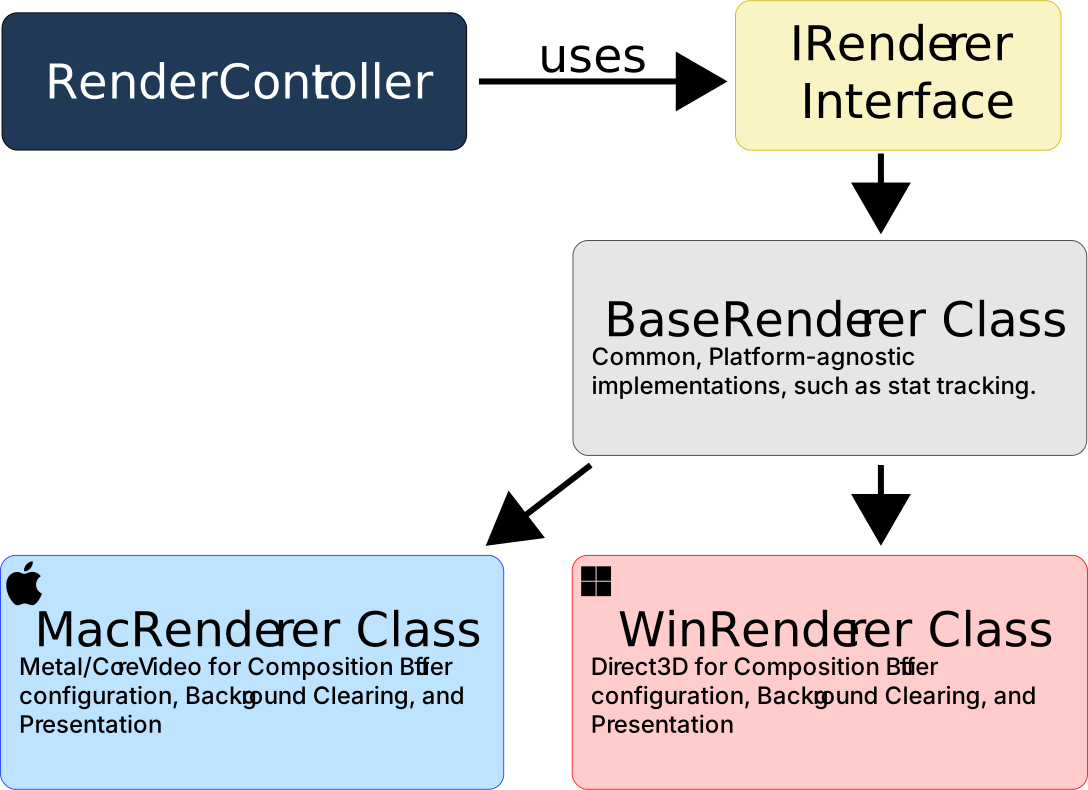
The clearest example was the Renderer. Windows could use a D3D-backed implementation, while macOS could use a Metal/CoreVideo-backed implementation. Both exposed the same renderer interface to the RenderController, while encapsulating their platform-specific resource management and presentation logic.
Different Renderer implementations and their inherited relationships
This use of polymorphism kept platform-specific behavior out of the render orchestration code and made renderer implementations interchangeable from the RenderController's perspective.
During initialization, a builder selects and constructs the appropriate component implementations and injects them into the RenderController. This keeps implementation-selection logic out of the render loop itself.
Render Update Flow
The RenderController owns a dedicated render thread. Each iteration of the render loop coordinates the pipeline's components to gather the current frames and layout, compose them into the renderer's buffer, and present the result. The thread then sleeps until the next render interval.
RenderController Render Start
Start the render cycle.
Renderer::OnBeforeComposition
Allocate invalidated resources and composition buffer.
In Software Composition: Map composition buffer texture to memory.
Renderer::ClearBackground
Clear the buffer with a background color.
FrameSinkManager::GetFramesForComposition
Lock all current source frames from all FrameSinks for composition.
LayoutManager::GetLayout
Lock and retrieve current layout config
Renderer::GetBuffer
Retrieve the buffer from renderer to give to Compositor.
Compositor::CompositeFramesToBuffer
Compose all locked source frames to the composition buffer using the locked layout config.
Renderer::OnAfterComposition
Clean up resources.
In Software Composition: Unmap composition buffer texture from memory.
Renderer::Present
Renderer presents the buffer; swap double buffers.
Handle Render Failures
Failures during the render cycle are tracked across iterations rather than immediately triggering a fallback. Repeated hardware composition failures can transition the renderer to software composition. If software composition also fails repeatedly, the pipeline reports a complete render failure back to the UI client.
Render Thread Sleep
Conclusion
Building this pipeline was one of my first major engineering projects at Microsoft. It required breaking a large existing system into clearly defined responsibilities, designing the interfaces between those components, and maintaining cross-platform behavior across Windows and macOS. The resulting architecture made the render pipeline easier to extend and maintain, while giving us cleaner ways to introduce platform-specific implementations and rendering fallback behavior.
It was also one of the projects that most shaped how I think about modularity, ownership boundaries, and designing systems for future change.
%20--%3e%3cdefs%3e%3cstyle%3e%20.st0,%20.st1,%20.st2%20{%20fill-rule:%20evenodd;%20}%20.st3%20{%20fill:%20%23f2f2f2;%20}%20.st1%20{%20fill:%20url(%23linear-gradient);%20}%20.st2%20{%20fill:%20url(%23linear-gradient1);%20}%20%3c/style%3e%3clinearGradient%20id='linear-gradient'%20x1='-556.62'%20y1='38.4'%20x2='-556.62'%20y2='39.4'%20gradientTransform='translate(8914%20-768)%20scale(16%2020)'%20gradientUnits='userSpaceOnUse'%3e%3cstop%20offset='0'%20stop-color='%23e03a39'/%3e%3cstop%20offset='1'%20stop-color='%23a42f14'/%3e%3c/linearGradient%3e%3clinearGradient%20id='linear-gradient1'%20x1='-486.23'%20y1='136.64'%20x2='-486.59'%20y2='137.02'%20gradientTransform='translate(2687.5%20-767.9895)%20scale(5.5%205.641)'%20gradientUnits='userSpaceOnUse'%3e%3cstop%20offset='0'%20stop-color='%23fff'%20stop-opacity='.1'/%3e%3cstop%20offset='1'%20stop-color='%23fff'%20stop-opacity='.3'/%3e%3c/linearGradient%3e%3c/defs%3e%3cg%3e%3cpath%20id='application-pdf-b'%20class='st0'%20d='M16,17.75c0,1.24-1.01,2.25-2.25,2.25H2.25c-1.24,0-2.25-1.01-2.25-2.25V2.25C0,1.01,1.01,0,2.25,0h8.25l5.5,5.5v12.25Z'/%3e%3cpath%20id='application-pdf-b1'%20class='st1'%20d='M16,17.75c0,1.24-1.01,2.25-2.25,2.25H2.25c-1.24,0-2.25-1.01-2.25-2.25V2.25C0,1.01,1.01,0,2.25,0h8.25l5.5,5.5v12.25Z'/%3e%3cpath%20id='application-pdf-e'%20class='st0'%20d='M10.5,0l5.5,5.5h-3.25c-1.24,0-2.25-.87-2.25-2.11V0h0Z'/%3e%3cpath%20id='application-pdf-e1'%20class='st2'%20d='M10.5,0l5.5,5.5h-3.25c-1.24,0-2.25-.87-2.25-2.11V0h0Z'/%3e%3c/g%3e%3cpath%20class='st3'%20d='M14.73,13.99c-1.01-1.42-2.49-1.55-4.58-1.6-.67-.57-1.27-1.24-1.68-1.97.78-1.94,1.59-3.97.53-5.46-.57-.66-1.61-.69-2.16,0-.94,1.22-.19,4.2.4,5.48-.52,1.03-.82,1.53-1.35,2.36-1.55.28-3.1.74-4.13,1.71-1.19,1.02-.79,2.82.86,2.84,1.77-.04,3.06-2.4,3.93-3.53.44-.07.92-.13,1.47-.18.64-.06,1.21-.1,1.72-.12.8.73,1.81,1.62,2.44,2.01.43.27.86.54,1.37.53,1.06.03,1.76-1.15,1.19-2.06ZM7.58,7.51c-.05-.4-.06-.82-.06-1.26-.02-.76.59-.97.81-.26.16.99-.13,2.01-.47,2.98-.14-.46-.23-.95-.28-1.47ZM2.18,16.02c0-.97,1.59-1.55,2.78-1.9-.55.65-1.93,2.79-2.78,1.9ZM7.35,12.59h-.03c.16-.29.38-.63.57-1.02.21.31.47.61.72.9-.41.03-.86.08-1.27.12ZM12.79,14.6c-.38-.25-.82-.59-1.35-1.05,2.67.16,3.03,2.15,1.35,1.05Z'/%3e%3c/svg%3e) PDF
%20--%3e%3cdefs%3e%3cstyle%3e%20.st0%20{%20fill:%20%23225ccc;%20}%20.st0,%20.st1,%20.st2%20{%20fill-rule:%20evenodd;%20}%20.st3%20{%20fill:%20%23fff;%20}%20.st2%20{%20fill:%20url(%23linear-gradient);%20}%20%3c/style%3e%3clinearGradient%20id='linear-gradient'%20x1='-486.23'%20y1='136.64'%20x2='-486.59'%20y2='137.02'%20gradientTransform='translate(2687.5%20-767.9895)%20scale(5.5%205.641)'%20gradientUnits='userSpaceOnUse'%3e%3cstop%20offset='0'%20stop-color='%23fff'%20stop-opacity='.1'/%3e%3cstop%20offset='1'%20stop-color='%23fff'%20stop-opacity='.3'/%3e%3c/linearGradient%3e%3c/defs%3e%3cg%3e%3cpath%20id='application-pdf-b'%20class='st1'%20d='M16,17.75c0,1.24-1.01,2.25-2.25,2.25H2.25c-1.24,0-2.25-1.01-2.25-2.25V2.25C0,1.01,1.01,0,2.25,0h8.25l5.5,5.5v12.25Z'/%3e%3cpath%20id='application-pdf-b1'%20class='st0'%20d='M16,17.75c0,1.24-1.01,2.25-2.25,2.25H2.25c-1.24,0-2.25-1.01-2.25-2.25V2.25C0,1.01,1.01,0,2.25,0h8.25l5.5,5.5v12.25Z'/%3e%3cpath%20id='application-pdf-e'%20class='st1'%20d='M10.5,0l5.5,5.5h-3.25c-1.24,0-2.25-.87-2.25-2.11V0h0Z'/%3e%3cpath%20id='application-pdf-e1'%20class='st2'%20d='M10.5,0l5.5,5.5h-3.25c-1.24,0-2.25-.87-2.25-2.11V0h0Z'/%3e%3c/g%3e%3cpath%20class='st3'%20d='M14.51,5.73l-2.34,10.85h-2.79l-1.38-6.5-1.45,6.51h-2.82L1.49,5.74h2.3l1.39,7.16,1.38-7.16h2.82l1.44,7.16,1.35-7.16h2.34,0Z'/%3e%3c/svg%3e) DOCX